This article contains affiliate links. If you sign up through my links, I earn a commission at no extra cost to you. This never affects my reviews — I cover the good and the bad.
If you spend any time looking at social media scheduling tools, you will eventually run into Pallyy. It keeps popping up on "best tools" lists, it has suspiciously positive reviews everywhere, and it is priced low enough that your first instinct is to assume it must be missing something important. I had the same instinct. So I signed up, connected my accounts, and actually used it — scheduling real posts, testing the social inbox, poking around the analytics, and generally trying to find out where the catch is.
Turns out the catch is more nuanced than "it is secretly bad." Pallyy does a lot of things really well, especially if Instagram is your main platform. But it also has some genuine limitations that matter depending on how you work. Here is the full picture.
Quick Verdict
Pallyy is a visual-first social media scheduling tool that absolutely shines for Instagram-focused creators and small businesses. The drag-and-drop calendar is one of the best I have used — it makes scheduling feel less like admin and more like planning. The Instagram grid preview is genuinely useful if you care about feed aesthetics, and the social inbox is surprisingly powerful for the price.
The downsides are real though. Analytics are only available for some platforms, scaling costs add up quickly if you manage multiple brands, and the lack of integrations with tools like Zapier or Google Drive means it does not fit neatly into everyone's workflow.
Best for: Solo creators, freelance social media managers, and small businesses focused on visual content — especially Instagram and TikTok.
Not ideal for: Large teams needing advanced collaboration, agencies managing more than a handful of clients (costs escalate fast), or anyone who needs deep analytics across every platform.
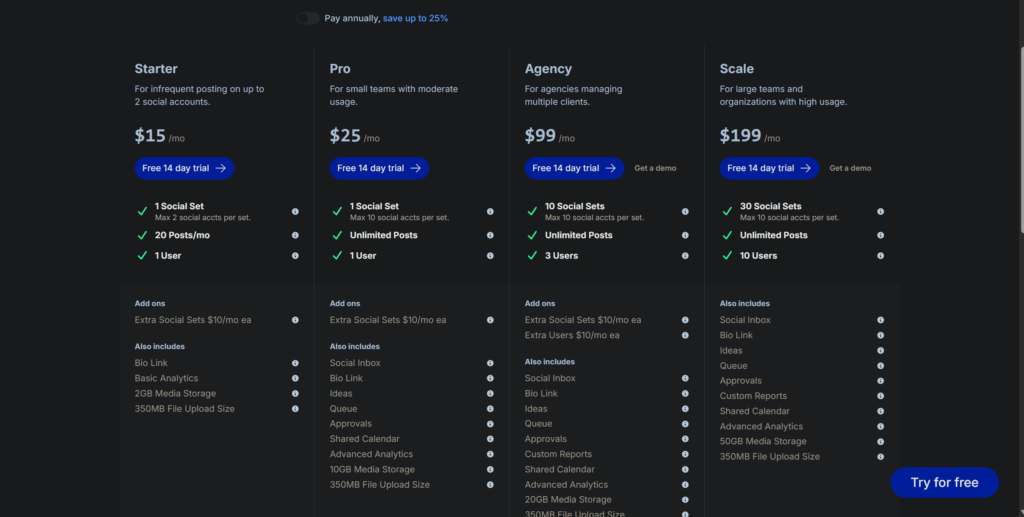
Pricing: Free plan available. Starter $15/month. Pro $25/month. Agency $99/month. Scale $199/month.
What Is Pallyy?
Pallyy is a social media management platform that started life as an Instagram analytics tool called ShareMyInsights. It has since evolved into a full scheduling, analytics, and community management tool supporting nine platforms — Instagram, Facebook, X, LinkedIn, Google Business Profile, Pinterest, TikTok, Threads, and YouTube.
What makes Pallyy different from the dozen other scheduling tools you are probably comparing it to is the visual workflow. Most schedulers give you a form: write your caption, upload your image, pick a time, done. Pallyy gives you a visual calendar with a media library on the side, and you literally drag your images onto the dates you want. It sounds like a small thing until you try it — then it feels like every other scheduling tool is doing things the hard way.
The company is Australian-based (which, as a fellow Australian, I can confirm does not automatically make the product better, but it does mean the support team operates in a timezone that is not completely hostile to anyone east of Greenwich). They have over 100,000 users and a reputation for being absurdly responsive to feature requests. Multiple users have reported asking for a feature and getting it implemented within days. That is either impressive customer focus or dangerously bad boundaries. Either way, your feature requests will probably be heard.
Who Is Pallyy For?
Instagram-focused creators who care about how their feed looks. The grid preview feature lets you see exactly how your upcoming posts will sit alongside your existing content. If you have ever agonised over whether that sunset photo should go next to the product shot or the quote graphic, this tool was basically built for you.
Freelance social media managers handling a small number of clients. One social set covers one brand across all nine platforms. If you manage two or three clients, the Pro or Agency plan covers you. The calendar sharing feature lets clients see what is queued up without needing their own Pallyy account, which saves you the "can you send me what is going out this week" email every Monday.
Small business owners doing their own social media. The free plan gives you 15 posts per month which is tight but usable if you post a few times a week. The Starter plan at $15 per month removes the posting limit and is cheaper than most competitors' entry-level plans.
Anyone who values a clean interface. I know this sounds subjective, but if you have ever opened Hootsuite and felt your will to live quietly exit through the nearest window, Pallyy's design will feel like a breath of fresh air. It is genuinely pleasant to use, and when you are spending time in a tool every day, that matters more than you think.
Pricing Breakdown
FREE PLAN — $0/month. 1 social set, 15 scheduled posts per month, basic features. No credit card required. Genuinely usable for testing the tool and for very light posting schedules.
STARTER — $15/month. 1 social set, 1 user, unlimited scheduled posts, social inbox, analytics, approval workflows, 10GB media storage. This is where Pallyy becomes a real tool rather than a teaser.
Pallyy uses a tiered pricing model with the concept of "social sets" — one social set equals one account per platform for one brand.
PRO — $25/month. 2 social sets, 2 users, everything in Starter plus custom reports, AI captions, and 20GB storage. Good for freelancers managing a client alongside their own brand.
AGENCY — $99/month. 10 social sets, 5 users, everything in Pro plus 30GB storage. Built for agencies with a handful of clients.
SCALE — $199/month. 30 social sets, 10 users, everything in Agency plus 50GB storage. For larger operations.
For comparison: Metricool's Starter plan is $20 per month with unlimited posts and includes competitor tracking. Buffer's Essentials is $6 per channel. Hootsuite starts at $199 per month for a single user. Pallyy sits comfortably in the affordable range, but it is worth noting that adding extra social sets costs $25 per month each and additional users cost $29 per month each on any plan. Those add-ons can sneak up on you.
What I Actually Liked
HThe Scheduling Interface Is Genuinely a Joy to Use
I do not say this about many SaaS tools. In fact, I do not think I have ever described a scheduling interface as "a joy" before, and I am mildly uncomfortable doing so now. But Pallyy's calendar really is that good.
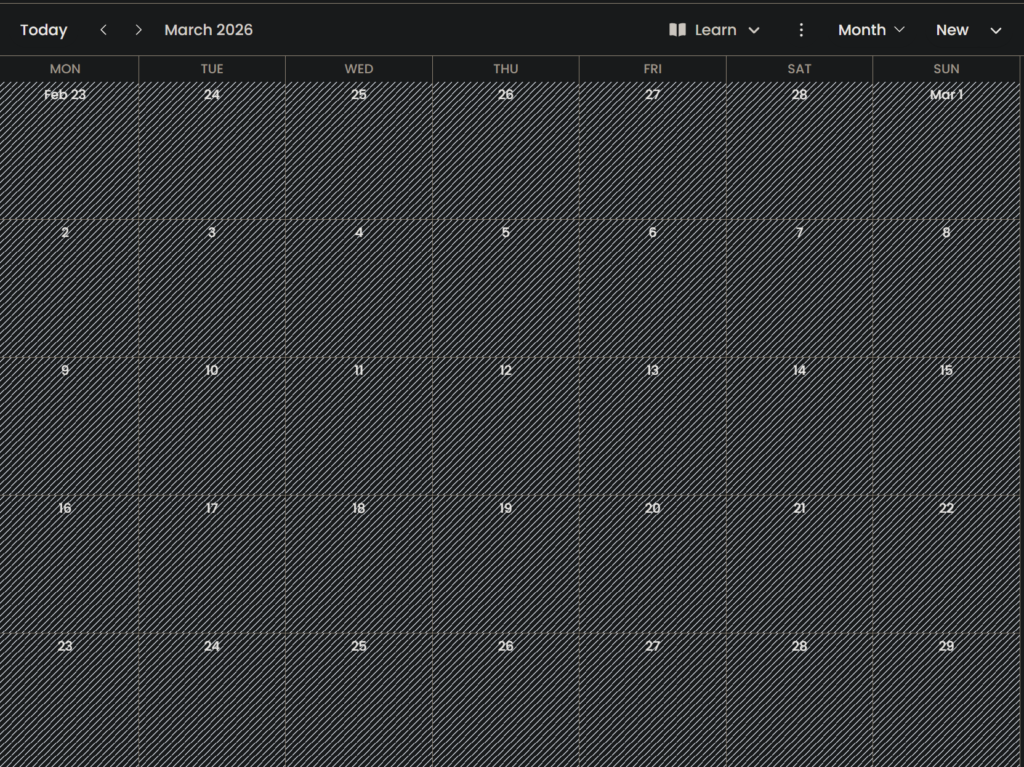
Your media library sits on the left. Your calendar sits on the right. You drag an image from the library onto a date. A composer pops up where you add your caption, select platforms, and schedule. The whole process takes maybe thirty seconds per post. Compare that to the "click new post, find your image file, upload it, wait, write caption, select platforms from a dropdown, pick a date from a date picker, confirm" workflow of most competitors, and Pallyy feels like it is skipping half the steps.
You can also set up queues — predefined time slots for each day of the week — and just drag content into the queue instead of manually picking times. This is fantastic for batch scheduling. Spend an hour on Sunday uploading your week's content, drag it all into queue slots, and forget about it until next Sunday. That is the kind of workflow that makes social media management sustainable instead of soul-crushing.
The Instagram Grid Preview Is Best-in-Class
If Instagram is your main platform, this feature alone might be worth the price of admission. Click on the Instagram Preview and you see a mock-up of your Instagram feed with your scheduled posts placed where they will appear alongside your existing published content.
You can rearrange scheduled posts in the preview to see how different arrangements look before anything goes live. This matters more than people think. A cohesive Instagram feed communicates professionalism and brand consistency, and it is nearly impossible to plan one without a visual preview tool. I have tried doing it with screenshots and Google Docs. It is awful. Pallyy makes it effortless.
The Social Inbox Is Surprisingly Good
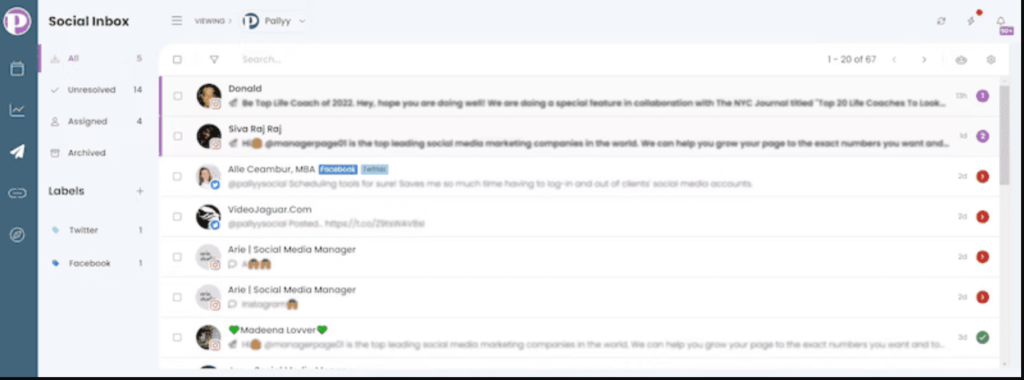
The social inbox pulls in comments, DMs, mentions, and reviews from your connected platforms into one view. You can reply to everything without switching between apps. For a tool at this price point, the inbox is more capable than I expected.
It supports Instagram, Facebook, X, TikTok, Google Business, and LinkedIn. TikTok and Google Business inbox support is unusual at this price — most competitors either do not offer it or lock it behind enterprise tiers. If you manage a local business with a Google Business Profile, being able to respond to reviews from the same dashboard where you schedule your posts is a nice workflow improvement.
The Bio Link Tool Is a Nice Freebie
Pallyy includes a link-in-bio tool that works similarly to Linktree. You can create a custom landing page with buttons linking to your website, products, content, or whatever else you need. There are themes and customisation options to match your branding, and you get analytics showing which links get clicked most.
This is included on all plans including the free plan. If you are currently paying for a separate link-in-bio tool, Pallyy can replace it and save you a few dollars a month. Not a game-changer, but a genuinely useful extra that rounds out the platform.
Customer Support Is Excellent
This came up repeatedly in user reviews and I can confirm it from my own experience. The team behind Pallyy is small but responsive. Support replies typically come within minutes during business hours, and there are multiple documented cases of users requesting features and having them implemented within days. One user mentioned that they pointed out an accessibility issue with alt text for images, and Pallyy added the feature within a few days. That kind of responsiveness is rare, especially from smaller tools.
What Could Be Better
Analytics Are Limited to Some Platforms
Pallyy offers analytics for Instagram, Facebook, and LinkedIn. That is it. If you are posting to TikTok, Pinterest, X, or YouTube, you will not get performance data for those platforms inside Pallyy. You will need to check native analytics on each platform separately.
For a tool that supports nine platforms for scheduling, having analytics for only three feels like a gap. Metricool, for comparison, provides analytics for every connected platform and includes competitor tracking on the free plan. If analytics matter to your workflow, this is a meaningful limitation.
Scaling Costs Add Up Fast
The base plans are affordable, but the add-on costs can surprise you. Each additional social set is $25 per month. Each additional user is $29 per month. If you are an agency managing five clients with two team members, your costs quickly climb past $200 per month once you factor in extra sets and users.
At that point, you are in Hootsuite territory price-wise but without Hootsuite's enterprise features. The Agency plan at $99 per month with 10 social sets and 5 users provides better value if you know in advance that you need scale, but plenty of users start on a cheaper plan and get sticker shock when they try to grow.
No Canva, Dropbox, or Google Drive Integration
Pallyy has a built-in media library, which is fine, but it does not integrate with Canva, Dropbox, Google Drive, or any external storage tool. This means you have to download your designs from Canva, then upload them to Pallyy's library manually. It is an extra step that most competitors have eliminated with direct integrations.
Update: Pallyy does have a built-in Canva editor within the post composer on some plans, which helps. But if your team's workflow revolves around a shared Google Drive or Dropbox folder for content approval, that workflow does not map onto Pallyy cleanly.
The Mobile App Is Bare Bones
Pallyy has a mobile app for Android and iOS, but it is essentially just a notification system for manual posts. You cannot schedule, edit, or manage content from the app. If you need to make a quick change to a scheduled post while you are away from your computer, you are out of luck. This is a notable gap in 2026 when most competitors offer fully functional mobile apps.
Free Plan Is Very Limited
Fifteen posts per month sounds reasonable until you do the maths. If you post to two platforms three times a week, you burn through your limit in less than three weeks. Most active social media users will outgrow the free plan within the first month. It works as a trial, but calling it a long-term free plan is generous. Metricool's free plan at 50 posts per month is significantly more usable.
Pallyy vs the Competition
Pallyy vs Metricool: Metricool is $20 per month with unlimited posts, analytics for all platforms, and competitor tracking. Pallyy is $15 per month with a better scheduling interface and Instagram tools but weaker analytics. If you prioritise visual planning and Instagram, Pallyy wins. If you need analytics and competitor tracking, Metricool wins. I use Metricool as my primary tool but Pallyy is genuinely tempting for Instagram-heavy work. Read my full Metricool review here: thesmmstack.com/metricool-review
Pallyy vs Buffer: Buffer is simpler and cheaper per channel ($6 per month), but it has no analytics, no competitor tracking, no social inbox, and no grid preview. If all you need is basic scheduling, Buffer is fine. If you want anything beyond that, Pallyy offers significantly more. Read my comparison: thesmmstack.com/metricool-vs-hootsuite-vs-buffer
Pallyy vs Later: Later is the closest competitor to Pallyy in terms of visual planning and Instagram focus. Later starts at $25 per month for the Starter plan with only 30 posts per month per profile — more restrictive than Pallyy's unlimited posts at $15 per month. Pallyy is better value for most users. Later's advantage is a more mature Linkin.bio feature and broader brand recognition.
Pallyy vs Hootsuite: Not really a fair comparison. Hootsuite starts at $199 per month and is built for enterprise teams. If you are reading this review, you almost certainly do not need Hootsuite.
Who Should NOT Use Pallyy
Being fair — Pallyy is not for everyone. Skip it if:
You need deep analytics across all platforms. Pallyy only covers Instagram, Facebook, and LinkedIn for analytics. If data drives your strategy across TikTok, YouTube, or Pinterest, you need Metricool or a dedicated analytics tool.
You are a large agency. The per-set and per-user pricing model makes scaling expensive. Once you are past five or six clients, purpose-built agency tools offer better value.
You rely heavily on integrations. No Zapier, no Google Drive, no Dropbox. If your workflow depends on automating content from external sources into your scheduler, Pallyy will feel like a bottleneck.
You need a strong mobile app. The mobile app is essentially a notification centre. If you manage social media on the go, this is a dealbreaker.
My Verdict
Pallyy is the best scheduling tool I have tested for Instagram-focused creators and small businesses who value a clean, visual workflow. The drag-and-drop calendar genuinely changes how scheduling feels — it is faster, more intuitive, and dare I say enjoyable compared to most competitors. The social inbox is strong, the bio link tool is a nice bonus, and the pricing is fair for what you get.
The limitations are real though. Analytics gaps, scaling costs, lack of integrations, and a weak mobile app mean it is not the right choice for everyone. If you need a broader all-in-one tool with analytics and competitor tracking across every platform, Metricool at $20 per month is the better pick. But if Instagram is your world and you want the most pleasant scheduling experience available, Pallyy earns a genuine recommendation.
Start with the free plan. You will know within a week whether it fits your workflow.
Related Reading
If you are comparing Pallyy against other tools, I have written detailed breakdowns that might help.
I ranked Pallyy alongside six other free schedulers in 7 Best Free Social Media Scheduling Tools in 2026 — worth reading if budget is your main concern.
For a deep-dive on the tool I personally use as my primary scheduler, check out my Metricool Review 2026: Honest Take on Features, Pricing & Cons.
And if you are specifically weighing up Metricool against Hootsuite and Buffer, I covered that in Metricool vs Hootsuite vs Buffer 2026: Which Is Actually Best?
Frequently Asked Questions
Is Pallyy free?
Yes. Pallyy has a free plan that includes 1 social set and 15 scheduled posts per month. It is usable for testing the tool and light posting but most active users will need to upgrade to the Starter plan at $15 per month.
Is Pallyy good for Instagram?
Pallyy is arguably the best scheduling tool for Instagram specifically. The grid preview, first comment scheduling, bio link tool, and visual calendar are all tailored for Instagram workflows. If Instagram is your primary platform, Pallyy should be at the top of your shortlist.
Can I schedule TikTok videos with Pallyy?
Yes. Pallyy supports TikTok scheduling. You can upload your video, add a caption, and schedule it from the same calendar you use for every other platform.
How many social media accounts can I connect?
One social set includes one account per platform across all nine supported networks. The Starter plan includes 1 social set. The Pro plan includes 2. The Agency plan includes 10. Additional sets can be added for $25 per month each.
Does Pallyy have a mobile app?
Yes, but it is limited. The mobile app is primarily used for receiving push notifications for manual posts. You cannot schedule, edit, or manage content from the app. Full functionality is only available on desktop.
Is Pallyy better than Metricool?
It depends on what you need. Pallyy has a better scheduling interface and stronger Instagram-specific features. Metricool has better analytics, competitor tracking, and broader platform coverage for data. If Instagram is your focus, Pallyy. If you need an all-in-one management tool, Metricool. Both offer free plans so you can try them yourself.